Rats Horde
I developed Rat Horde in Unreal Engine, a personal project that allowed me to refresh my knowledge and gain a better understanding of how to program complex behaviors in Niagara. This project showcases the incredible potential and versatility of Niagara, which can be used for various purposes, including driving gameplay logic.
The Rat Horde simulation I created features various states for each rat, a Level of Detail (LOD) system, and vat animations. The rats interact with the player and also check for nearby light sources in the surroundings, avoiding them.
It is not only visually engaging but also cost-effective in terms of performance, considering the number of particles spawned.
The system uses Niagara for GPU particle simulation. Rats in the system detect and avoid the player and lights. They can be killed by stomping or shooting. [SOUND ON]
A state machine has been developed in the Niagara system, utilizing GPU parallel processing to enable thousands of actors to exhibit unique behaviors at a low GPU cost.
I added a simple minigame to the system. Only one white rat spawns, and we can create unique gameplay logic from it. No Particle Persistent IDs have been used.
The system has four available rat mesh LODs. LOD 0 uses Vertex Animation Textures (VAT) to animate the rats. The higher LODs apply World Position Offset (WPO) in the shader to reduce rendering cost for distant rats.
The systmem reads the location and radius of light sources, and as a result, the particles tend to avoid those areas.
The system is pretty flexible. It took me a couple of minutes to modify the behavior of the rats in order to make the horde crawling out from a sewer.

The rat has been modeled, UVed, rigged (IK setup), and animated in blender.

The Rat has been painted in Substance Painter. This step was taken in between the modelling and rigging setup.
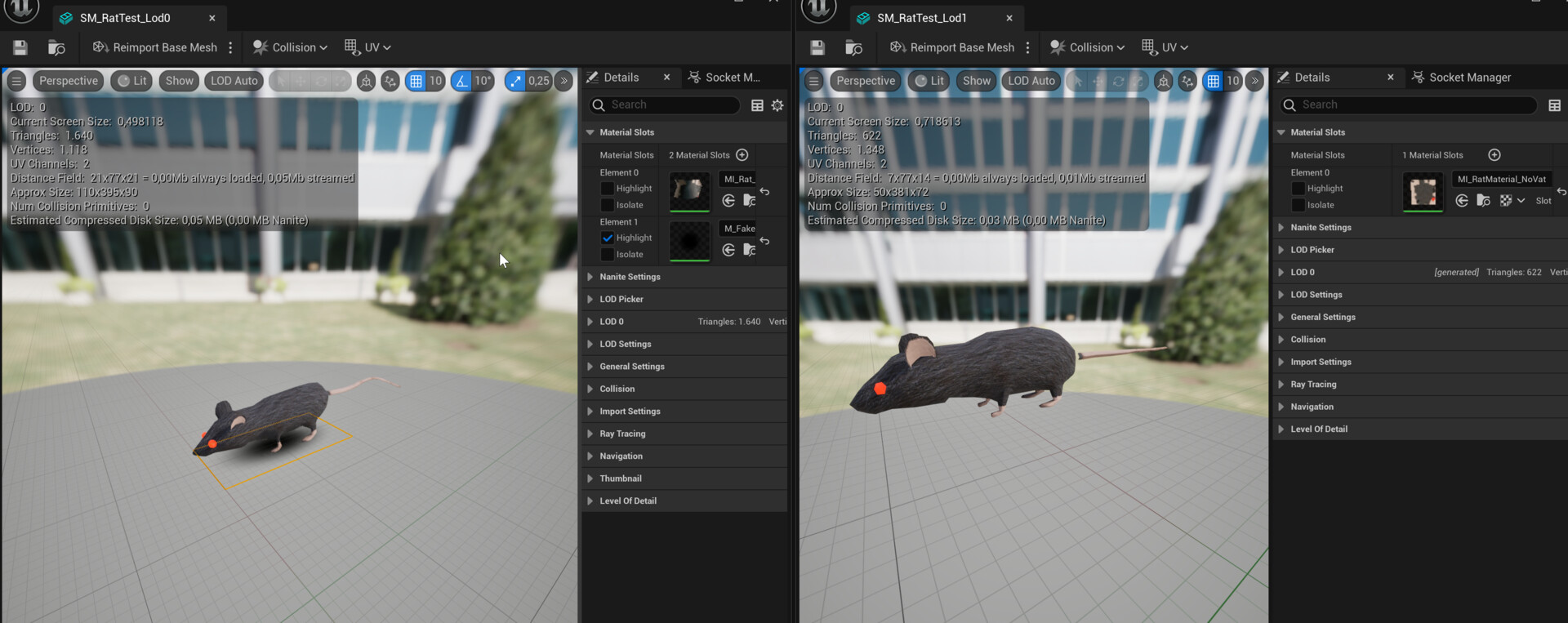
In this picture, we compare the LOD0 and LOD1 of the rat. The main difference is a fake shadow plane using a translucent material with a sphere mask for shadow simulation.

The rat animation of Lod 0 has been baked in VAT textures in houdini. Lod 1 and Higher uses simple WPO applied at the vertex stage.

Substance Designer is used for the decal splashes. These decals are spawned when rats are killed and are aligned based on the normal direction of the distance field. This step doesn't involve raycasting; it leverages existing data within the system.

Splash particles are spawned when a non-white rat is killed. Killing the white rat triggers a burst of colored confetti.

Houdini is used to set up a fluid simulation to export a low-poly 'splash' mesh for use in the blood particle.

Outcome of the Houdini fluid simulation setup.

An overview of the assets used to visualize the system. Only 11.37 MB of assets are loaded in memory.

Some stats regarding the average cost of running the simulation. Consider my setup as follows:
CPU: Intel(R) Core(TM) i7-7700K @ 4.20GHz
GPU: NVIDIA GeForce GTX 1080
Memory: 16GB